
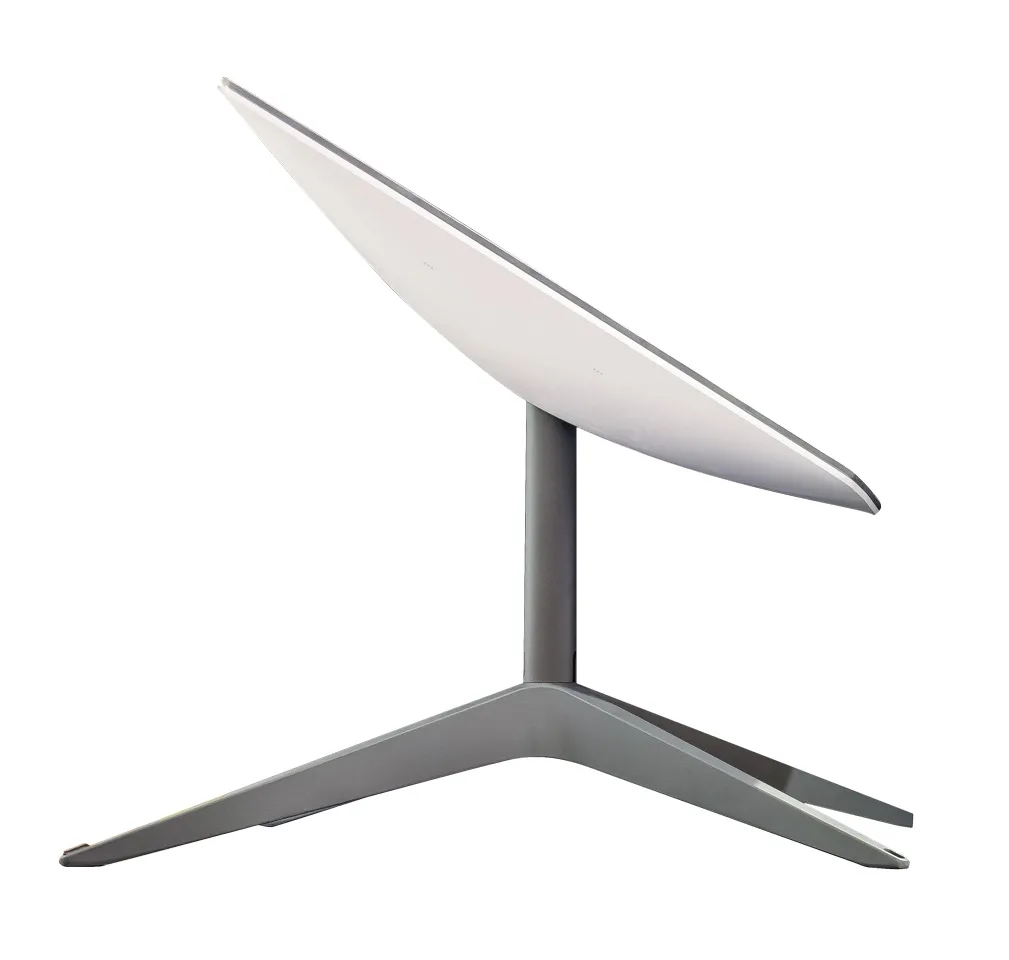
Maintaining internet access while traveling has never been easier.
By Chris Dougherty, F263059
November/December 2024
A t no time in history has humanity been so interconnected. The internet has linked almost every society worldwide, and mobile technology puts much of the knowledge known to mankind in our pockets. Artificial intelligence (AI) allows this technology to talk to and make decisions for us.
In the early 2000s, I met an interesting couple who were “pioneers” in the mobile connectivity world. Left homeless following a fire, Megan Edwards and Mark Sedenquist bought a motorhome and hit the road. Megan wrote a book about their experiences called Roads From The Ashes: An Odyssey In Real Life On The Virtual Frontier, and the couple started a website called Roadtrip America (roadtripamerica.com). In the early days, mobile internet connectivity, which they called “dashboarding,” looked very different from how it looks today. Still, the foundational concept remains the same: staying connected to the World Wide Web while traveling the roads of North America.
In those days, travelers hunted for wired (telephone dial-up modem) or Wi-Fi connections, followed by satellite internet. Cellular internet connectivity wasn’t yet a thing. RV parks often provided telephone connections for RVers at the campsite or in the campground office. As someone who also worked from an RV, I always sought a connection. The booths at Flying J travel centers were a frequented spot.
Hughesnet satellite internet was the choice of some RVers back then who needed a connection. It required a motorized roof-mounted satellite dish with a huge reflector, and it cost thousands of dollars to own and operate. The speeds were ridiculously slow, even by the standards of the day.
Fast-forward to 2024, and satellite internet is once again the premium form of connectivity. Starlink (starlink.com) has become the go-to internet source for serious dashboarders. Although the service may be premium, the cost is coming down.
As of this writing, options include the Starlink Mini ($599), sized to fit in a backpack, with maximum speeds over 100 Mbps, making it perfect for backpackers and road trippers. The Mini Roam plan is limited to 50 GB of data for $50 per month. For RVers who use more data, the Mobile Regional plan, which is unlimited, costs $150 per month. The service can be paused and works in motion beyond 10 miles per hour. For those who require faster, more reliable connections, like businesses or emergency responders, Mobile Priority service is available. This gives the user precedence over other plans, especially at high usage times.
The Mobile Priority service costs $250 to $5,000 monthly, depending on the amount of data required. In addition, high-performance hardware is needed for Priority service, which increases the hardware cost to $2,500, as compared to $599 for the basic Mini unit.
Cellular is the most commonly used internet service for today’s dashboarders and has become much more reliable over the past few years with the rollout of 5G service. That said, it has downsides that mobile users need to contend with.
The cost of service with cellular providers can be a moving target and beyond the scope of this article. However, many FMCA members find value in TechConnect+, the cellular data discount package negotiated by FMCA as a member benefit (FMCA.com/techconnect).
TechConnect+ currently offers mobile internet data and cellphone plans with T-Mobile and a data-only package with AT&T. These plans provide members low-cost options.
With the Tech Connect+ MAX plan, which includes T-Mobile service, $59.99 per month lets you enjoy unlimited data and speeds up to 380 Mbps on 4G LTE and 5G networks, with coverage across the U.S. and with limited speeds and data in Canada and Mexico. Even if you exceed 100 GB of usage and experience reduced speeds on busy towers, your speeds will return to normal when you connect to less crowded towers. Plus, FMCA’s plan prioritizes members’ data on cell towers, giving them faster speeds and a more reliable connection compared to typical users when the network is congested. With a $39.99 one-time rental fee, FMCA loans members an Inseego Mifi X Pro 5G hotspot device. An associated voice plan is available for $19.99 per month if you bring your own phone.
A second option, Tech Connect+ Plus with AT&T service, also costs $59.99 per month, featuring unlimited data with reliable speeds up to 25 Mbps on 4G LTE. While on the slower side, this plan is suitable for browsing, emailing, and everyday use. This plan has only U.S. coverage. After 100 GB, speeds may slow on busy towers, but speeds will bounce back on less crowded ones. A $39.99 activation fee is required, and a Moxee device is provided on loan by FMCA.
Unlike some other plans, service on the Tech Connect+ plans can be temporarily suspended for a maximum of three months per year, reducing the monthly plan cost but not eliminating it.
Regardless, a careful plan comparison is in order, not only once but at least annually to make sure you have the best deal you can get for the service you need. 5G (fastest) service is almost ubiquitous — but not quite. 5G service also is dependent on your devices and whether they support it. Some carriers have more or better coverage than others in different locales. This can be a challenge for travelers, as one carrier might work well for you in a certain area, whereas a competing service might work better in another.
One fix for this is to have more than one device and use separate carriers. This increases the odds of having a working device if any carrier signal is available. Some devices, such as newer Apple iPhones, have electronic SIM cards that allow multiple accounts. This lets the user pick whichever one will work in a particular location. The downside is having multiple contracts that can’t be suspended when not in the RV.
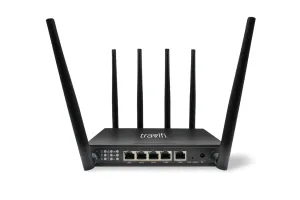
The TravlFi Journey XTR offers a multi-network 4G/LTE router and Wi-Fi extender, and it comes with an embedded SIM.
Another option is TravlFi (travlfi.com). With the TravlFi system, you can get a device that pulls from multiple carriers, boosts campground Wi-Fi, and even has an optional external antenna for the Journey XTR router. With any of these, adding a cellular booster (WeBoost, King, etc.) will make reception in “lightly” covered areas as good as possible. The company also offers 5G connectivity. However, that package involves a single carrier.
The TravlFi data plan subscription packages range from 2 GB 4G for $19 per month to unlimited 5G for $159. The plans are pay-as-you-go and can be canceled anytime, which is super convenient.
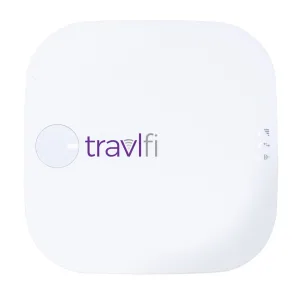
The TravlFi Journey1 LTE Wi-Fi hot spot searches for and connects to the strongest cellular signal, regardless of the network.
The mounting hardware for TravlFi varies depending on the model. However, I have noticed that the aforementioned Journey XTR has an available mounting kit with an external antenna, which, while a bit pricey, would allow the unit to be moved easily from one RV to another, or even used in a hotel or cabin on another trip.
Wi-Fi and internet in campgrounds range from nonexistent to excellent, with most falling in the lower 50 percent in our experience, but this has also been improving. We recently stayed at the Charleston (South Carolina) KOA, which had wired internet at each campsite. We ran a long networking cable out to the box from a standard wireless router (through the slideout seal) and were set. In a more permanent setup, I could install a RJ-45 Ethernet connection port on the exterior of the RV that runs into wherever my router is installed in the RV.
While I don’t know how many RV parks have been upgrading to wired Ethernet at every site, now that it’s a possibility, it might be good to select hardware that would be compatible with that in addition to park Wi-Fi.
To be clear, if you’re going to use unsecured public Wi-Fi, and most of it is, then you must use a Wi-Fi repeater/router device to increase security. In addition, this allows you to use all your RV’s IoT (internet of things) devices easily; connect the router to the park Wi-Fi, and everything in your “network” now has access.
The TravlFi unit has an input for wired internet, as does the higher-end router from WiFiRanger, a Winegard company. Another product that I use extensively is the GL.iNet GL-A1300 Pocket VPN Travel Router, available on Amazon or the company’s website (gl-inet.com). These routers are tiny, easy to travel with, and create a secure private network wherever you are. While the smaller antennas may be less sensitive than others, they work pretty nicely, and the newer models (since I bought the A1300 in March of 2023) are faster. Prices for these little routers start at about $33, up to $112.
Your new RV may have come with a Wi-Fi router, a cellular access point, or both, or with a prep kit. This allows you to upgrade the system to suit your needs, with the benefit of a rooftop antenna. WiFiRanger Converge routers from Winegard (winegard.com) are a premium, stand-alone option for internet, ranging from $100 to $999. Their Gateway and ConnecT options are worth a look as well. The Gateway works with the Air 360+ rooftop antenna, which also serves as a boosted over-the-air (OTA) TV/FM antenna. The ConnecT 2.0 4G+ is a Wi-Fi access point and extender, and it serves as an OTA/FM radio antenna.
Networking and internet access in the RV has never been easier, safer, or faster. Being an Apple person, I have an Apple TV, MacBook Pro, and iPhone in the mix, and I use iCloud as a cloud storage platform for a very workable and integrated system. Apple’s Continuity system works seamlessly across all Apple devices and iCloud no matter where I am, which I like. Of course, there are other options out there that use Windows and Android, and many of the IoT devices in the RV world are Android-based. They all have apps for both iOS and Android as needed, however. When RVing, it’s always better to have good hardware with the most connectivity and security in the smallest sizes and with the least wiring to run, and with Apple’s system, I have that.
I would be remiss if I didn’t mention RV multiplexing systems with global connectivity. While these generally do not have routers or access points integrated into them, they will benefit from the router you install. Of course, a 12-volt-DC router that can connect to the RV’s 12-volt-DC system is ideal; DC voltage converters are available on Amazon that will convert the voltage from 12 volts DC, up or down as needed, and may be an option if the router you choose is not 12 volts DC. The RV-specific routers are 12 volts DC.
How far you go equipping your RV for internet connectivity is up to you; for many, the whole idea is to unplug. But in this modern world, staying connected, if for no other reason than emergency communication, is essential. Not long ago, it cost a lot of money to network an RV, but not so much anymore. For under $100, you can have basic, secured Wi-Fi networking in your home on wheels. Mobile internet packages ensure quality connectivity, even for those who work on the road.
And then there’s always the vacation videos.
STARLINK SERVICE |
||||
| Fixed Standard | Fixed Priority | Mobile Standard | Mobile Priority | |
| Availability | ≥99% | ≥99% | ≥99% | ≥99% |
| Download | 25-100 Mbps | 40-220 Mbps | 5-50 Mbps | 40-220 Mbps |
| Upload | 5-10 Mbps | 8-25 Mbps | 2-10 Mbps | 8-25 Mbps |