

Temp°Stick sends alerts via text or email when interior air quality reaches preset levels.
By Mark Quasius, F333630
February 2020
When you leave a pet alone in your RV, its safety is paramount. An RV plugged into a campground pedestal runs the risk of a power failure that shuts off the air conditioners, and on a warm, sunny day, the interior gets hot in a hurry. No one wants to be responsible for Fido or Fluffy suffering from heat exhaustion, or worse.
Such a scenario can be prevented. An automatic generator start (AGS) system is a step in the right direction. An AGS is designed to turn on the generator when shore power fails and the thermostat calls for cooling. But this approach is not fail-safe. The generator may not start, or it may prematurely stop for a number of reasons. In addition, the air conditioners themselves could fail.
Fortunately, products are available that warn people remotely when the temperature rises or drops inside an RV. Some simply send a warning based on a temperature threshold; others feature more advanced operations, such as a video feed of the coach interior. Regardless, every system requires an internet connection at the RV and at the remote location.
Many RV owners have installed a router that broadcasts a private Wi-Fi network to laptops, tablets, smartphones, etc. The router can connect to a campground Wi-Fi network, or it can use a cellular connection such as an air card or a SIM card. Some routers can switch between either method as needed. If you have a smartphone and a router that can connect your RV to the internet, you have the basics of what’s needed for a monitoring system. The only missing piece is a device to handle the communication. Many monitoring systems rely on a cellular device to communicate directly to a smartphone via a cellular service provider. They charge a monthly fee for this access.
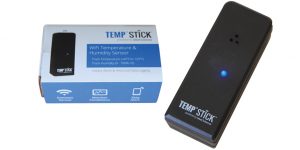
The Temp°Stick sensor, which is smaller than a Twinkie snack cake, can be installed in various locations.
The device I chose for my RV is Temp°Stick, by Ideal Sciences. A small, battery-powered sensor uses my RV’s Wi-Fi network to access the internet. I then can go online via any web-connected PC, tablet, or smartphone to connect with the sensor. I can check the RV’s interior temperature and humidity at any time, view the temperature and humidity history log, and receive emergency warnings I’ve set up. This system has no monthly service or usage fees, because it utilizes whatever the RV’s router is connected to, be it your existing cellular service or campground Wi-Fi. The only cost is the price of the Temp°Stick, which at the time of this report was $139.
Pet owners are not the only ones who can benefit. Temp°Stick and similar products are useful for monitoring whether RV refrigerator/freezer temperatures are within the accepted range. For instance, the evaporator fan and the control board failed on my motorhome’s residential refrigerator. While diagnosing and repairing the problem, I used my Temp°Stick to monitor the refrigerator’s temperatures over time and display them on my laptop’s screen and iPhone app. It worked great, and gave me the information I wanted.
And, as noted, Temp°Stick can keep tabs on humidity levels. Not only is high humidity uncomfortable, it promotes mold growth and can lead to health problems.
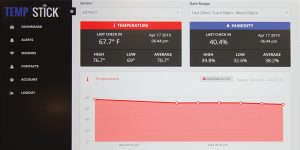
Using a smartphone, PC, or tablet, a user can view the Temp°Stick dashboard, which shows the current temperature and humidity, as well as the history of that data.
Each Temp°Stick sensor has a unique identification number, so multiple sensors can be deployed, each with its own warning level. With a sensor temperature range from minus 40 degrees Fahrenheit to 140 degrees Fahrenheit, one sensor could be placed in the freezer to warn when it’s becoming too warm, and another sensor could be placed in the RV’s main living area.
In addition, sensors can be placed in distant locations. For example, you could put one at your sticks-and-bricks home to monitor a possible furnace failure, and other sensors could be placed in your RV. With that setup, you would need an active internet connection (such as cable or DSL) at your home while you are gone.
Installing Temp°Stick is simple, and the instructions are clear. The sensor is smaller than a Twinkie snack cake, 3.5 inches by 1.25 inches by 1.38 inches, with a small LED in front. It comes with a pair of AA lithium batteries and some hook-and-loop strips for mounting. I inserted the batteries, and the LED began flashing, indicating the system was in setup mode.
Next, I went to the Wi-Fi settings on my laptop (you can use any internet-enabled device with a web browser, such as a smartphone or tablet). I connected to the Wi-Fi network named “Sensor Setup,” which included the sensor serial number (necessary in the event you have multiple sensors). Then, I opened my web browser, and in the URL address bar I entered 10.10.1.1. That displayed the Temp°Stick setup page. I then selected my own Wi-Fi network. I also had to enter my password so the sensor could communicate with the Ideal Sciences web server. At that point, the system successfully ran a 30-second test. Then the sensor automatically closed the setup network and returned my laptop to its usual Wi-Fi network. (Please note: If instead of using a router, you grab a campground’s Wi-Fi signal, then your network name will change and Temp°Stick will have to be reset in order to access the internet.)
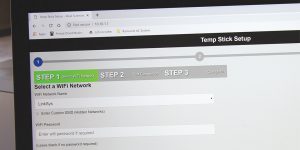
Instructions for setting up the Temp°Stick system using an internet-enabled device such as a laptop are straightforward. Temp°Stick requires an active Wi-Fi connection.
My next task was to set up a monitoring account. I pointed my web browser to the Tempstick.com website, and I went to the setup page. I created an account by entering an email address and password. That brought me to a dashboard with a pull-down menu, which shows all of a user’s sensor numbers (I had only one at that point). The dashboard screen displayed the temperature and humidity at the sensor, as well as the dew point and the Temp°Stick battery life, which was 100 percent.
I then selected the “Alert” tab and set up a notification to warn me if the interior RV temperature reaches 80 degrees. I gave the alert an easily identifiable name, and I entered a warning message that I will receive if that temperature is reached. I set it up to warn me by email as well as by a text message to my phone. I then clicked on the “test alert” button; within a few seconds, I received a text and an email.
You can activate multiple alerts so that you get an early warning at one temperature and a more serious message at a higher temperature. You also can put a pause on alerts while keeping them on file for future use. If you have multiple sensors, you can name each one to help identify their locations.
Also, you can decide how often a sensor sends data to the server. The default is every 60 minutes. Keep in mind that more frequent updates affect the battery life. As noted, Temp°Stick comes with two AA lithium batteries (which are recommended over alkaline, because lithium batteries last longer as well as perform better in cold environments).
Each sensor can be calibrated so that it provides an accurate temperature reading. I made a slight adjustment after I found that my sensor read about 0.2 degree higher than the thermometer I placed next to it.
With no monthly fees and the ability to communicate with remote locations, Temp°Stick has proven to be a great addition to our coach. It will warn us should the air conditioning fail while we’re away. I plan to add a second sensor to monitor the basement freezer.
More Info
Ideal Sciences
(888) 263-6973
www.tempstick.com